
Security assessment
Review of users, plugins, themes, files, updates, hosting controls and exposed endpoints.
WordPress protection services
Layered WordPress hardening, monitoring and recovery support for businesses that cannot afford a compromised website or polluted search presence.
What this service solves
SEO Clicks Pro approaches WordPress security as defence in depth: reduce exposure, detect abnormal behaviour, preserve recovery options and protect normal business workflows. A WordPress website combines core software, themes, plugins, users, hosting and server rules. Every unnecessary component, weak credential and delayed update increases the opportunity for abuse. A compromise can affect visitors, business data, email reputation and Google’s index.
We apply defence in depth: reduce exposed features, control access, maintain backups, monitor suspicious behaviour and keep the site recoverable. Security is balanced against normal editing, ecommerce, forms and integrations so protection does not break the business.
For simple service websites, the security question can become architectural: does this site need WordPress at all? I cover that decision in static websites as an SEO recovery tool.
Security response map
The first decision is the state of the site. Every later action depends on that classification.
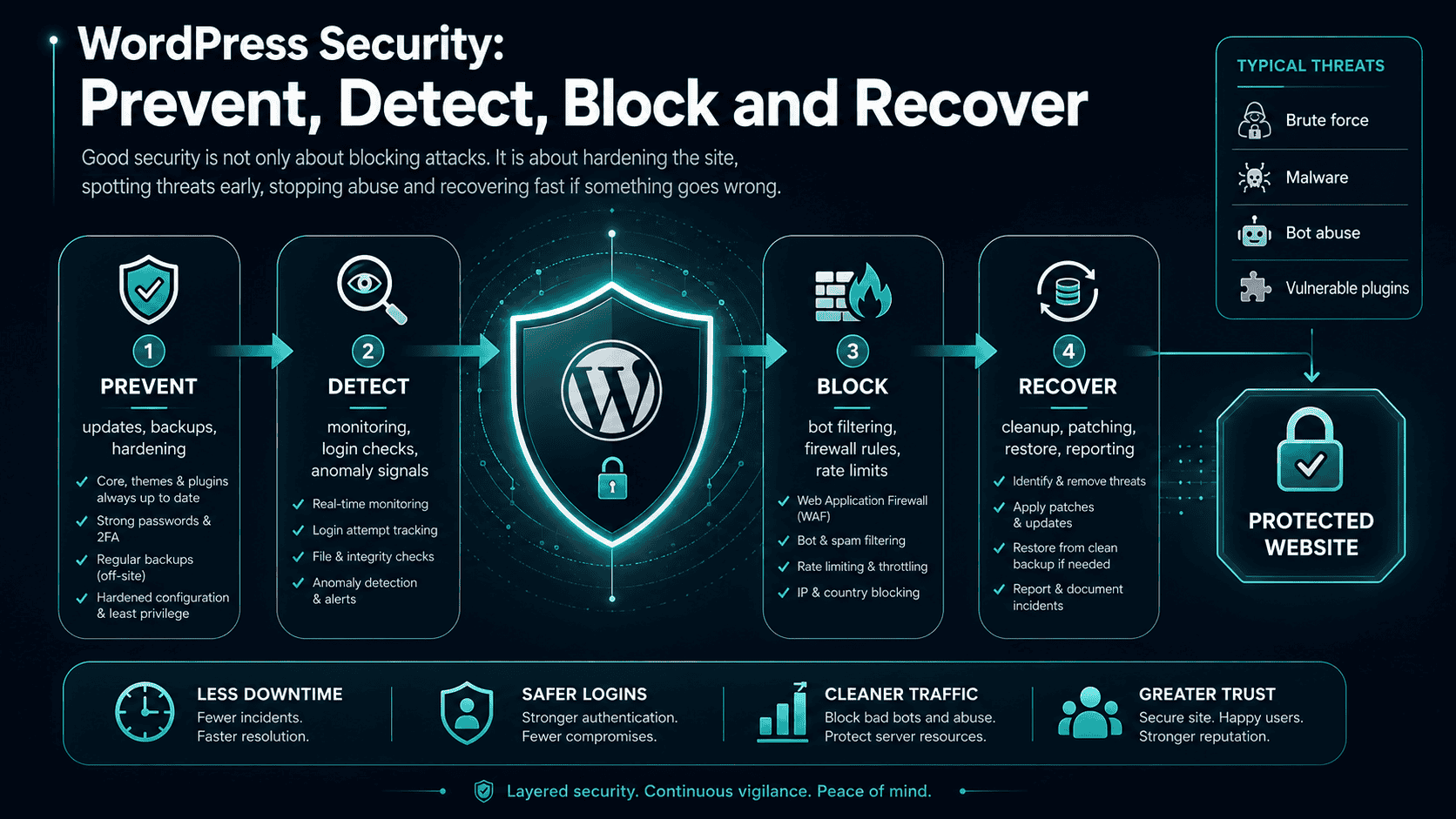
What is included
Scope follows the site state and exposure. Prevention, active abuse and compromise response require different levels of access and evidence.
Review of users, plugins, themes, files, updates, hosting controls and exposed endpoints.
Reduction of unnecessary features, tighter permissions and safer access behaviour.
Rules and monitoring designed around observed request patterns and operational needs.
A practical path to restore clean files and data after failure or compromise.
Inspection for suspicious code, modified files, injectors and persistence mechanisms.
Updates, monitoring, incident response and reporting according to the chosen plan.
Business outcomes
Unnecessary entry points and risky defaults are removed or restricted.
Suspicious changes and request patterns become more visible.
Clean backups and documented access reduce the cost of an incident.
Identify the security state first
Treating every WordPress security problem as “install a security plugin” misses the state that actually determines the work.
Hardening, least privilege, update discipline, firewall controls, backups and monitoring can be introduced without the pressure of an incident.
Reduce the attack surface before it is tested.The focus becomes visibility: what is being requested, from where, how often and whether legitimate users are being affected by countermeasures.
Block carefully while preserving evidence.Containment, integrity checks, credential rotation, restoration and cause analysis take priority over cosmetic hardening.
Stabilise first; rebuild trust second.Our process
We preserve the current state, investigate before deleting evidence, then harden and validate the site so protective changes do not break legitimate workflows.
Access, backups and current symptoms are secured before major changes.
Files, users, plugins, logs and server behaviour are reviewed for compromise paths.
Malicious changes are removed and protection is applied without breaking legitimate workflows.
Updates, integrity and attack patterns are watched so the site does not drift back into risk.
Why SEO Clicks Pro
Security can affect login, APIs, caching, SEO crawlers and paid-traffic measurement; those interactions are checked instead of treated as someone else’s problem.
Discuss your projectFrequently asked questions
If you are seeing suspicious behaviour, send the symptoms and timeline; avoid mass-changing the site before the evidence has been captured.
Ask about this service →Yes, subject to access and the condition of the hosting environment. A proper clean-up includes identifying malicious files, removing persistence, updating vulnerable components and changing compromised credentials.
No single plugin covers every risk. Effective protection includes updates, permissions, credentials, backups, hosting controls, monitoring and safe operational practices.
Poorly designed rules can. We use observation, allowlists and staged enforcement where appropriate so legitimate visitors, administrators and integrations continue working.
Security updates should be addressed promptly, but changes should be backed up and tested. The correct process depends on site complexity and business criticality.
The live cause must be removed first. Spam URLs should then return an appropriate status such as 404 or 410, while Search Console and removal tools can help manage visibility during clean-up.
Start a conversation
Tell us whether the site is clean, unstable, actively attacked or already compromised and what access you still have.