Lead-flow map
A clear picture of capture, qualification, routing, ownership, follow-up and reporting.
Lead systems and workflows
Connect forms, campaigns, CRM actions and follow-up workflows so qualified leads reach the right person and fewer opportunities disappear.
What this service solves
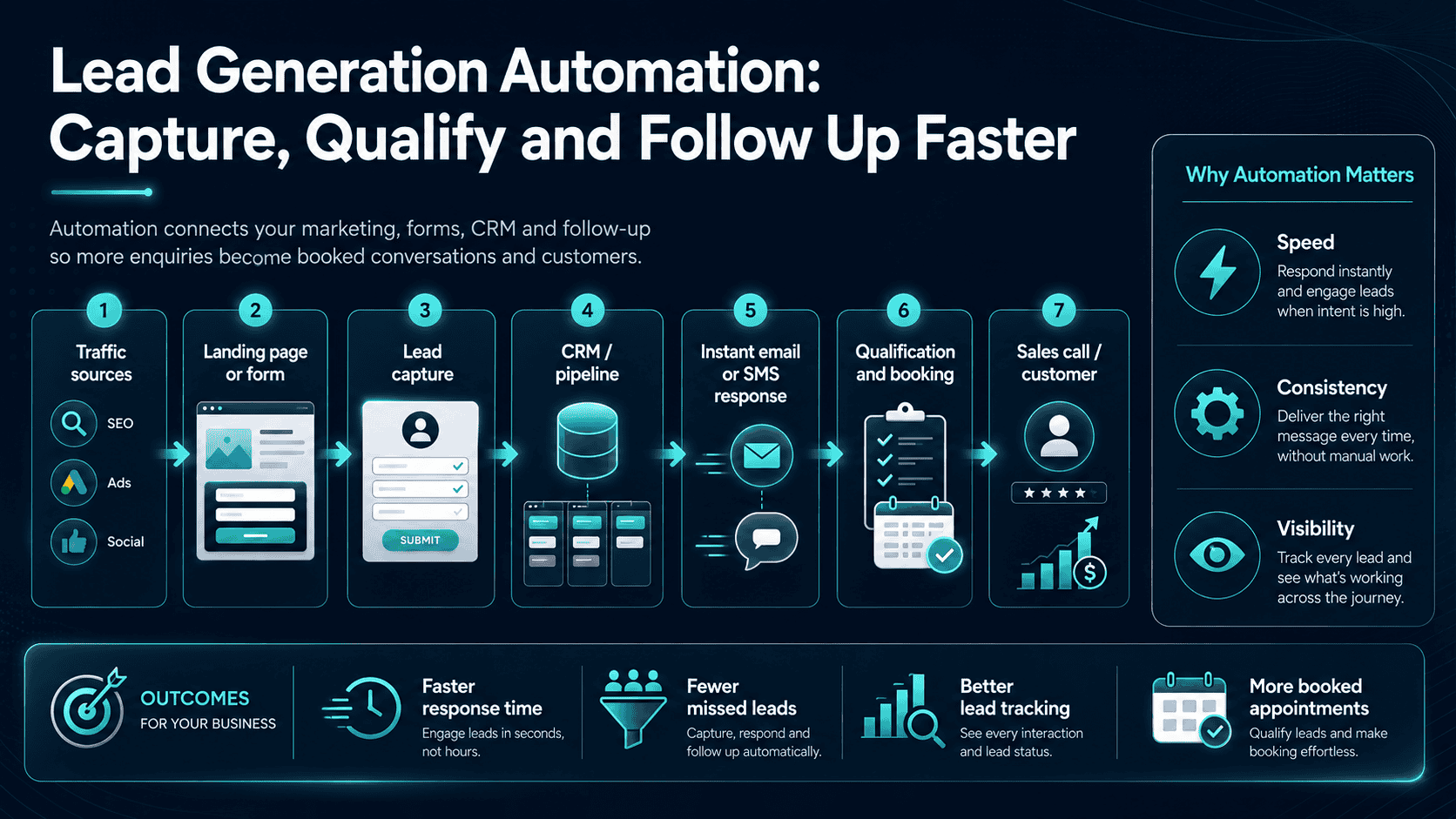
SEO Clicks Pro treats lead generation automation as the ownership layer between enquiry and response: every lead needs a destination, a clock and a next action. Many businesses lose opportunities between the website form and the first meaningful response. Leads sit in an inbox, sales tasks are not assigned, follow-up timing is inconsistent and nobody can see where the enquiry came from.
We design practical lead workflows that connect landing pages, forms, email, CRM records, notifications and follow-up steps. Automation handles predictable movement while keeping human judgement where it matters.
The lead clock
Automation is most useful at the hand-offs - the moments where a person, inbox or system can quietly drop the opportunity.
What is included
Scope depends on the hand-offs: a simple form-to-phone workflow may need only routing and reminders, while a sales team may need CRM stages, branches and escalation.
A clear picture of capture, qualification, routing, ownership, follow-up and reporting.
Reliable transfer of lead details into the chosen system.
Assignment based on service, location, value, urgency or team responsibility.
Timed messages and reminders with conditions that prevent irrelevant communication.
Alerts when a lead is urgent, unassigned or waiting too long.
Source, status and response information needed to improve the process.
Business outcomes
New leads reach the correct person with the information needed to act.
Routine reminders and sequences reduce dependence on memory.
Ownership and status are visible throughout the lead journey.
Our process
We map the current lead path with humans included, design the future state, test every branch and add automation only where the next action is unambiguous.
We identify manual steps, delays, exceptions and the systems already in use.
Triggers, conditions, delays, ownership and failure handling are agreed before building.
Integrations and automations are implemented with test leads and realistic edge cases.
Failures, bottlenecks and response data are reviewed after launch.
How mature is the lead flow?
A one-person business missing form notifications needs something very different from a sales team coordinating multiple channels and pipelines.
Forms, calls, WhatsApp or inbox enquiries have no dependable routing, ownership or response clock.
Create one reliable capture-and-alert layer.The opportunity is in assignment rules, reminders, qualification, sequences and escalation when a lead does not move.
Connect the systems around the lead lifecycle.At this stage automation should segment by source, value, geography, service and behaviour while keeping human intervention visible.
Use automation to prioritize, not hide, important leads.Why SEO Clicks Pro
Automation touches landing pages, CRM, messaging and staff behaviour; we keep those interfaces visible instead of hiding the whole process inside one workflow.
Discuss your projectFrequently asked questions
Send us a real example of a lead that got lost or delayed; that usually exposes the first automation opportunity faster than a feature wishlist.
Ask about this service →The exact options depend on available integrations and APIs. Common systems can often be connected directly or through n8n, webhooks and email-based workflows.
Yes. Sequences can include immediate acknowledgements, timed follow-ups, reminders and conditional exits when a lead replies, books or changes status.
No. It should remove repetitive handling and improve consistency while keeping relationship-building and judgement with people.
Yes, provided the form and CRM offer a suitable integration, webhook, API or secure intermediary workflow.
A production workflow should log errors, retry safe actions and notify a responsible person. Silent failure is not an acceptable design.
UK B2B and agentic search
Explore B2B SEO for longer buying journeys and AI SEO workflows that use bounded agents for monitoring and organisation while people retain publishing control.
Explore B2B SEO UK →Start a conversation
Tell us where leads arrive, who should own them and what should happen when nobody responds.