
WordPress, Shopify, Webflow or static? The best CMS platforms for business websites in 2026, and which one stops costing you money as you grow.
For many local businesses, the best website platform is not a CMS at all.
WordPress is our strongest all-round CMS recommendation, Shopify is the practical ecommerce choice, and Ghost is excellent for publishing. But if your local business mainly needs service pages, location pages, credibility and enquiries, a well-built static website is usually faster, simpler and easier to maintain.
See our static website serviceChoosing a website platform is not just about which editor feels easiest on day one. The real question is what your business will need to operate, maintain, optimise and grow over the next three years.
That is why this guide looks beyond feature lists. We compare the realistic learning curve, whether you will eventually need a developer, how much maintenance each option creates, how beginner-friendly it is in normal use and which type of business it actually suits.
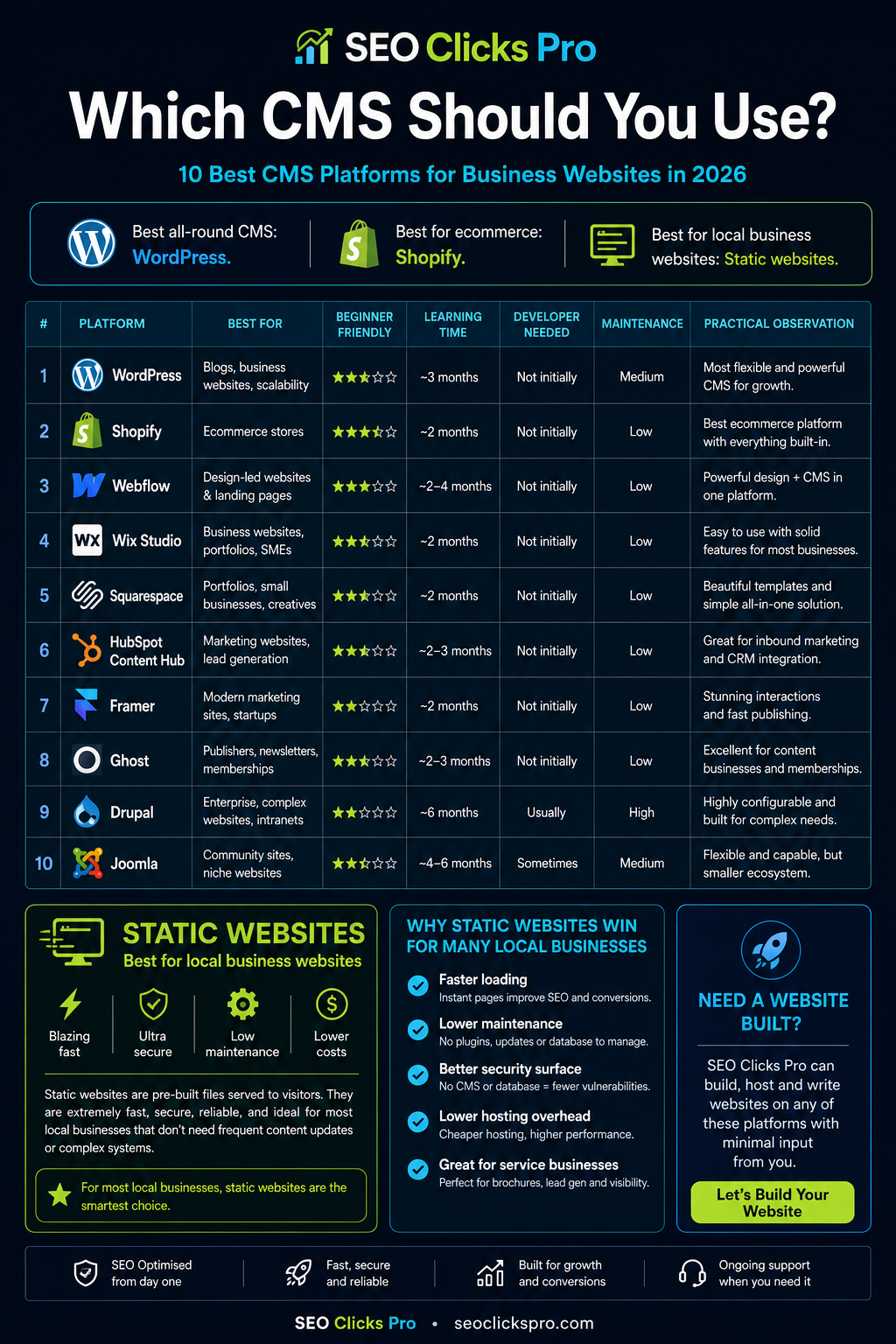
Practical observation: Ease of editing and ease of owning are not the same thing. A builder can make changing a headline very easy while making migration, technical SEO, custom development or performance work harder later. Choose for the next three years of the business, not the first afternoon of editing.
The comparison at a glance
If you only want the short version, this is where we would start:
- Best for local business websites: Static HTML/CSS/JavaScript.
- Best all-round CMS: WordPress.
- Best for ecommerce: Shopify.
- Best for design-led marketing sites: Webflow.
- Best for easier DIY management: Wix Studio or Squarespace.
- Best for B2B teams already using a CRM stack: HubSpot Content Hub.
- Best for modern startup marketing sites: Framer.
- Best for publishers, newsletters and memberships: Ghost.
- Best for complex enterprise environments: Drupal.
- Best when an existing team already knows it well: Joomla.
Our learning-time estimates are deliberately conservative. We are talking about an average person learning around a normal job and normal life - not a software marketer claiming you can “master” a platform in a weekend.
Before the CMS ranking: static websites are often best for local business websites
A static website is not technically a CMS. We are including it because sometimes the best CMS decision is not to install a CMS at all.
For many plumbers, electricians, builders, lawyers, accountants, clinics, consultants, roofers, trades and other local service businesses, the website has a fairly simple job: explain the service, show where you operate, build trust and generate a call, WhatsApp message or enquiry.
- Speed: pre-built files can be served directly without assembling each page through a database-driven CMS.
- Maintenance: there is no CMS core, plugin stack or theme ecosystem that needs constant attention.
- Security: fewer moving parts generally means a smaller public attack surface.
- Technical SEO: the markup, URLs, metadata and internal linking can stay extremely clean and predictable.
- Hosting: static sites are lightweight and inexpensive to host well.
- Business fit: most local businesses do not need employees publishing new content every morning.
Practical observation: If nobody in the business edited the website last month, ask why you are carrying an entire content-management system purely so somebody could edit it.
We build static websites specifically for local businesses.
They are designed around speed, search visibility, trust and enquiries rather than unnecessary backend complexity. We can also host the site, write the copy and maintain it for you.
Explore static website designThe 10 best CMS platforms for business websites in 2026
Static websites have their own place. The ranking below covers actual CMS platforms and the situations where each one makes sense.
1. WordPress - Best all-round CMS
WordPress remains our strongest all-round CMS recommendation because it can handle service pages, blogs, landing pages, directories, memberships, integrations and large content libraries without forcing the business into a closed website-builder ecosystem.
Who is WordPress best suited for?
Businesses that publish regularly, expect the website to grow, need multiple content types or want broad access to developers, plugins and integrations.
Learning curve and ownership
- Beginner friendliness: moderate.
- Realistic time to become genuinely competent: about 3 months for the average person.
- Developer required: not necessarily at first; increasingly useful as requirements become more advanced.
- Maintenance burden: medium. Core, themes, plugins, backups, security and performance all need attention.
- Speed potential: good to excellent when built carefully; poor when overloaded.
WordPress pros
- Huge ecosystem and community.
- Strong SEO potential.
- Easy to find experienced developers.
- Can grow considerably with the business.
- You can choose your own hosting and own the site files and database.
WordPress cons
- Plugin conflicts and bloat are common on poorly managed builds.
- Security needs active attention.
- Performance depends heavily on the theme, plugins and hosting.
- It is very easy for a simple site to become unnecessarily complicated.
Practical observation: WordPress is easy to start and surprisingly easy to overcomplicate. Five plugins become fifteen, then twenty-five, and eventually nobody remembers what half of them do.
2. Shopify - Best for ecommerce
Shopify is the practical answer when selling products online is the core purpose of the website. It handles a large amount of ecommerce infrastructure for the business owner.
Learning curve and ownership
- Best suited for: ecommerce stores and product-first businesses.
- Beginner friendliness: good.
- Realistic learning time: about 2 months.
- Developer required: usually not for a normal store; useful for advanced theme or integration work.
- Maintenance burden: low because the platform itself is managed.
Pros
- Commerce features are built around selling.
- Hosting and core platform maintenance are managed.
- Product, order and checkout workflows are mature.
- Large app and partner ecosystem.
Cons
- App subscriptions can accumulate.
- Deep custom work can become specialist work.
- You are operating inside Shopify's platform.
- It is unnecessary for a simple brochure or local service website.
Practical observation: Shopify gets you selling quickly, but small extra requirements have a habit of turning into another monthly app subscription.
3. Webflow - Best for design-led marketing websites
Webflow is strong when visual control matters and the marketing team wants a sophisticated front end without a traditional development workflow.
Learning curve and ownership
- Best suited for: design-led marketing sites and landing pages.
- Beginner friendliness: moderate.
- Realistic learning time: about 2-4 months.
- Developer required: not always, although genuine web knowledge helps enormously.
- Maintenance burden: low.
Pros
- Strong visual control.
- Managed hosting.
- Structured CMS content.
- Good fit for capable design and marketing teams.
Cons
- The learning curve is steeper than “no-code” implies.
- Advanced work still benefits from front-end knowledge.
- Migration can be awkward.
- Not our first choice for every large editorial site.
Practical observation: “No-code” does not mean “no skill”. A good Webflow build still requires an understanding of structure, responsive behaviour, layout and content modelling.
4. Wix Studio - Best DIY/pro hybrid option
Wix Studio is substantially more capable than the old reputation of Wix suggests. It combines approachable editing with structured content and deeper agency/developer tooling.
Learning curve and ownership
- Best suited for: SMEs and teams that value easy editing.
- Beginner friendliness: good.
- Realistic learning time: about 2 months.
- Developer required: usually not for a normal site.
- Maintenance burden: low.
Pros
- Approachable visual editing.
- Managed infrastructure.
- Useful CMS collections and business tools.
- Quicker for many owners to learn than WordPress.
Cons
- Platform lock-in matters.
- Advanced custom work can be less direct than owning portable code.
- Migration is not as clean as moving a static codebase.
- Easy editing can encourage inconsistent page structures.
Practical observation: Wix Studio is easy to self-learn, but easy editing does not automatically mean easy migration or unrestricted ownership later.
5. Squarespace - Best for simple professional websites
Squarespace is a solid choice when someone wants a polished professional website without managing the technical platform underneath it.
Learning curve and ownership
- Best suited for: consultants, portfolios, creatives and small professional sites.
- Beginner friendliness: good.
- Realistic learning time: about 2 months.
- Developer required: generally no for normal use.
- Maintenance burden: very low.
Pros
- Polished templates.
- Managed hosting and updates.
- Simple day-to-day editing.
- Good fit for intentionally small websites.
Cons
- Less flexible for unusual requirements.
- Advanced customisation has limits.
- Platform dependence.
- Not ideal for complicated information architecture.
Practical observation: Squarespace is strongest when the website is intentionally simple. Once the business starts asking for unusual workflows, that simplicity can become the limitation.
6. HubSpot Content Hub - Best for CRM-connected B2B teams
HubSpot Content Hub makes the most sense when the website is part of a broader CRM, sales and marketing system rather than a standalone brochure.
Learning curve and ownership
- Best suited for: B2B marketing and sales teams already using HubSpot.
- Beginner friendliness: moderate.
- Realistic learning time: about 2-3 months.
- Developer required: not for normal use; useful for deeper customisation.
- Maintenance burden: low.
Pros
- Strong CRM alignment.
- Content, lead generation and marketing data live close together.
- Managed platform.
- Useful for lead-driven B2B organisations.
Cons
- Costs can rise as the stack grows.
- The strongest value appears when you use more HubSpot products.
- Creates ecosystem dependence.
- Overkill for a simple local business site.
Practical observation: Buying HubSpot Content Hub only for a simple website misses much of the point. It makes sense when the CRM and marketing stack are part of the same decision.
7. Framer - Best for modern startup and marketing sites
Framer is attractive for startups and modern brands that want a crisp, design-forward marketing site with relatively light CMS needs.
Learning curve and ownership
- Best suited for: startups and modern marketing sites.
- Beginner friendliness: moderate to good.
- Realistic learning time: about 2 months.
- Developer required: usually not for a normal marketing site.
- Maintenance burden: low.
Pros
- Design-forward workflow.
- Fast publishing.
- Managed platform.
- Good fit for modern campaigns and startup sites.
Cons
- Less suited to complex content models.
- Advanced requirements can outgrow its sweet spot.
- Platform dependence.
- Not our first choice for large editorial operations.
Practical observation: Framer can produce beautiful front-end results quickly, but it is not the first platform we would choose for a complicated content architecture.
8. Ghost - Best for publishers, newsletters and memberships
Ghost is a focused publishing platform. When newsletters, posts, memberships and audience ownership matter, its narrower scope can make it cleaner to operate than WordPress.
Learning curve and ownership
- Best suited for: publishers, newsletters and membership businesses.
- Beginner friendliness: moderate to good for publishing.
- Realistic learning time: about 2-3 months.
- Developer required: usually not on managed Ghost; useful for custom themes or self-hosting.
- Maintenance burden: low on Ghost(Pro), medium when self-hosted.
Pros
- Focused publishing experience.
- Memberships and newsletters fit naturally.
- Cleaner scope than WordPress for publishers.
- Managed Ghost can be very low maintenance.
Cons
- Less general-purpose than WordPress.
- Custom themes require technical skill.
- Self-hosting adds server responsibility.
- Not the natural fit for every local service business.
Practical observation: Ghost is not more time-consuming than WordPress in normal use. On managed Ghost it is often simpler. The additional work appears mainly when you self-host or need deeper custom development.
9. Drupal - Best for enterprise complexity
Drupal earns its place when the website is genuinely complex and the organisation needs sophisticated content structures, permissions or custom workflows.
Learning curve and ownership
- Best suited for: enterprise, government and complex structured sites.
- Beginner friendliness: low.
- Realistic learning time: about 6 months before the average person is genuinely comfortable.
- Developer required: often.
- Maintenance burden: high compared with simpler managed builders.
Pros
- Powerful structured content.
- Strong permissions and workflows.
- Highly extensible.
- Built for complex requirements.
Cons
- Steep learning curve.
- Developer involvement is common.
- Higher implementation burden.
- Complete overkill for most SMEs and local businesses.
Practical observation: Drupal is powerful, but for most SMEs it is like buying an industrial machine to butter toast.
10. Joomla - Flexible, but more niche today
Joomla remains a capable open-source CMS and can make sense in community, multilingual or existing Joomla environments, but it has a smaller ecosystem and mindshare than WordPress.
Learning curve and ownership
- Best suited for: community sites and organisations with an existing Joomla-skilled team.
- Beginner friendliness: moderate.
- Realistic learning time: about 4-6 months.
- Developer required: sometimes.
- Maintenance burden: medium.
Pros
- Open source.
- Flexible content and access controls.
- Multilingual capabilities.
- Capable when a team already knows it well.
Cons
- Smaller ecosystem than WordPress.
- Less beginner-friendly than simpler builders.
- Developer availability can be narrower.
- Harder to justify for a brand-new simple local business site.
Practical observation: Joomla is still capable, but for a new project we would choose it when its specific strengths or an existing Joomla-skilled team make the decision obvious - not simply because it exists.
Which platform should your business choose?
- Local service business with 5-30 stable pages: static website.
- Content-heavy service business: WordPress.
- Ecommerce: Shopify.
- Design-led marketing team: Webflow.
- Owner wants simple DIY management: Wix Studio or Squarespace.
- B2B team already invested in HubSpot: HubSpot Content Hub.
- Startup marketing site: Framer.
- Publisher, newsletter or membership business: Ghost.
- Large complex organisation: Drupal.
Useful question: How often did somebody in your company actually need to edit the website last month? The answer can tell you whether you need a CMS more clearly than a fifty-feature comparison table.
SEO Clicks Pro can build, host and write websites across these platforms.
You do not need to arrive with a finished sitemap, polished copy and a technical specification. For many projects we only need the core business details: what you sell, your services or products, phone numbers, addresses or service areas, important offers, brand material and anything technically specific.
From there we can plan the structure, write the website copy, build the pages, set up the hosting, handle the technical SEO and fill in the practical gaps intelligently. If WordPress, Shopify, Webflow, Wix, Ghost or another platform genuinely fits the project better, we can build there too.
Tell us about your businessThe bottom line
The best CMS is the one that fits how the business actually works. But for many local businesses, the strongest website is not a CMS at all. It is a fast, clean static website that loads quickly, requires very little maintenance and turns visitors into calls or enquiries.
If you want help deciding, talk to SEO Clicks Pro. We can recommend the right platform, build it, host it and write it with surprisingly little input needed from your side.